IUP Computer Science
CO 310 Fall 1984
Assignment #4
File 310BASE.COMPSCI contains student enrollment records for
various courses in random order (The records are not ordered by
student name or by course number). Each record contains the
following information.
Columns 1-12 Student name Columns 13-17 Course number
File 310UPDATE.COMPSCI contains drop and add transaction
records which need to be applied to the enrollment records. Each
record in the 310UPDATE file contains the following information.
Column 1   Update code  (A to add, D to drop)

Columns 2-13   Student name        Columns 14-18   Course number
Write a program that performs the following four tasks.
1. Read in the records of the 310BASE file and builds a linked
list which holds the student names in alphabetical order. From
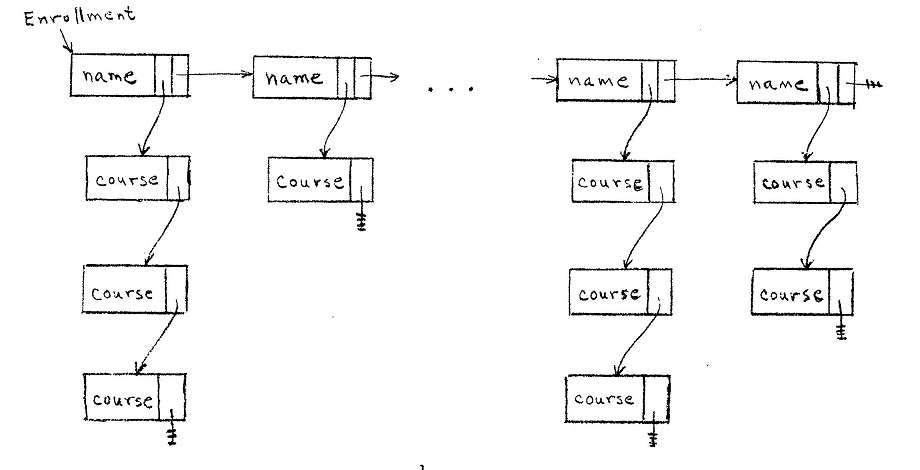
each student name node, build a linked list to hold the courses
that the student is taking. There is no required order for the
course nodes. Your implementation may use singly or doubly
linked lists, with or without header nodes, circular or linear.
The resulting structure might look something like this.
2. Print out the enrollment information when the structure is
complete; that is, when you reach the end of the 310BASE file.
The printout should list the students in alphabetical order, with
all courses for each student, in the form
     student
        course
        course
        .
        .
     student
        course
        course
        .
        .
     .
     .
3. Read each record from the 310UPDATE file and change the
enrollment structure as indicated. If the transaction is a drop,
find the student and course and delete the course node. If the
transaction is an add, find the student and add a course node to
the student's list of courses. You are guaranteed that all
records in the 310UPDATE file are valid; that is, for a course
drop, you are guaranteed that the student is taking the course;
and for a course add, you are guaranteed that the student is not
taking the course already.
4. After all updates have been applied to the structure, print
out the enrollment information again. The printout should be in
the same form as in 2.